 Free Internet Speed Test for the UK – Check Your Broadband, Wifi and Mobile Speed Instantly
Multi opens several parallel connections (closer to real-world browsing/streaming). Single uses one connection (shows the ceiling of a single stream/download).
Press GO to start your free speed test.
Your Network Details
Approximate location based on your public IP address not your precise GPS position.
Your Test History
| Time | Download (Mbps) | Upload (Mbps) | Ping (ms) | Jitter (ms) |
|---|
Whether you're on Virgin Media cable, BT full fibre, Sky, TalkTalk or a 5G mobile plan, our free internet speed test gives you an instant, accurate read on exactly what your connection is delivering right now, right where you are in the UK.
Key Takeaways
- Most people only think to test their internet speed when something feels wrong a video call freezes, a download crawls, or a game starts lagging.
- Our tool runs entirely inside your browser using modern web technology, so there's nothing to install and nothing left behind afterwards.
- The headline numbers can look intimidating if you're not familiar with the terminology, but they're straightforward once broken down.
- The UK's broadband landscape has changed dramatically over the past few years, and results vary widely depending on where you live and what infrastructure has reached your street.
- The UK broadband market is genuinely competitive, and the differences between providers go beyond just headline speed figures.
- With EE, Vodafone, O2 and Three all continuing to expand 5G coverage across UK towns and cities, mobile broadband has become a genuinely viable option for some households, not just a backup.
- One of the most common sources of confusion is why a wifi speed test on a laptop gives a noticeably lower result than the package speed advertised, even when nothing seems wrong.
- Before assuming your broadband package itself is the problem, there are several practical steps worth trying, most of which take just a few minutes.
Why Run a Speed Test in the First Place
Most people only think to test their internet speed when something feels wrong a video call freezes, a download crawls, or a game starts lagging. But a speed test is useful far more often than that.
If you're paying for a broadband package advertised at, say, 150 Mbps, the only way to know whether you're actually getting close to that is to test it directly rather than guess from how fast a webpage loads.
Browsing speed is a poor indicator because most websites load in well under a second even on a modest connection, masking real shortfalls that only show up when you're streaming 4K video, uploading large files, or gaming online.
Running a speed test regularly also builds a track record. If you test your internet speed once a week and keep a mental note (or a screenshot) of the results, you'll immediately spot when something has actually degraded versus when it's just an off day.
This is invaluable when you need to raise a fault with your provider, because most UK ISPs will ask for evidence of underperformance before they investigate or agree to compensation under Ofcom's automatic compensation scheme.
A speed test is also the fastest way to settle household arguments about 'whose device is hogging the wifi', to check whether a new router or mesh system actually improved things, or to compare performance before signing up for a new provider at a new address.
In short: testing isn't just for troubleshooting, it's a basic form of digital literacy that helps you get what you're paying for.
How This Speed Test Actually Works
Our tool runs entirely inside your browser using modern web technology, so there's nothing to install and nothing left behind afterwards. When you click start, three separate measurements happen in sequence, each targeting a nearby test server chosen for low latency.
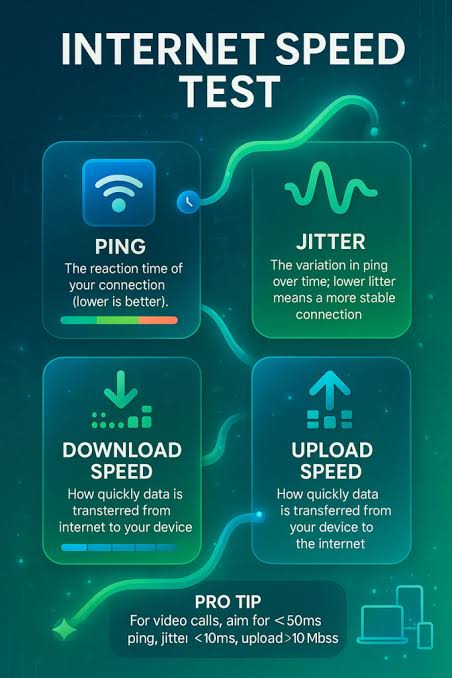
First comes ping and jitter: the tool sends a series of small data packets to the server and times how long each round trip takes, in milliseconds.
The average of these round trips is your ping (also called latency), and the variation between individual measurements is your jitter a low, consistent jitter matters just as much as a low ping for anything happening in real time.
Next is the download test, where the tool pulls multiple data streams from the server simultaneously and measures how quickly your connection can receive that data, converting the result into megabits per second (Mbps).
Multiple parallel streams are used because a single connection thread rarely saturates a modern broadband line, so this mirrors how real downloads, streaming and browsing actually behave.
Finally, the upload test reverses the process, pushing data from your device to the server to measure how fast you can send information out critical for video calls, cloud backups and uploading photos or files.
Throughout all three stages, animated charts update in real time so you can watch your speed ramp up, stabilise or fluctuate as the test runs, rather than just staring at a spinner.
Alongside the numbers, the tool also identifies your internet service provider and an approximate location based on your IP address, so you immediately have context for the result without needing to check separately.
How to Read Your Results: Mbps, Ping and Jitter Explained
The headline numbers can look intimidating if you're not familiar with the terminology, but they're straightforward once broken down.
Download speed, measured in megabits per second (Mbps), tells you how quickly data arrives at your device this is the figure that matters most for streaming, browsing and downloading files, and it's usually the number quoted in broadband adverts.
Upload speed measures the reverse direction: how quickly your device can send data out, which matters for video calls, uploading content to social media or cloud storage, and remote work involving large file transfers.
As a rule of thumb, most UK residential broadband connections are asymmetric, meaning download speed is significantly higher than upload this is normal and by design, since most household internet use is download-heavy.
Full fibre (FTTP) connections are increasingly offering more balanced or even symmetric speeds, which is a genuine advantage for anyone who works from home or streams content live.
Ping, measured in milliseconds, reflects how responsive your connection is: a lower number means less delay between an action (like clicking a link or pressing a button in a game) and the response.
Anything under 20ms is excellent, under 50ms is generally fine for gaming and calls, and above 100ms starts to feel noticeably laggy in real-time applications, though it barely affects everyday browsing.
Jitter, also in milliseconds, shows how stable that ping is over time a connection with 15ms average ping but wildly swinging jitter can actually feel worse for video calls than a slightly higher but rock-steady ping, because inconsistency causes stuttering and dropped frames.
Typical Internet Speeds Across the UK
The UK's broadband landscape has changed dramatically over the past few years, and results vary widely depending on where you live and what infrastructure has reached your street.
According to Ofcom's own connectivity reports, average UK download speeds have climbed well past 70 Mbps nationally, driven largely by the rapid rollout of full fibre (FTTP) networks from Openreach, Virgin Media O2, CityFibre and a growing list of alternative network providers (altnets) like Hyperoptic, Community Fibre and Gigaclear.
In major cities and many large towns, full fibre packages now regularly offer 500 Mbps to 1 Gbps or more, with upload speeds to match. However, this national average masks real disparities.
Rural and semi-rural areas, particularly in parts of Scotland, Wales, and the more remote counties of England, still rely on older copper-based FTTC (fibre to the cabinet) connections or, in some cases, ADSL, where realistic download speeds might sit anywhere from 10 to 60 Mbps depending on distance from the cabinet.
The government-backed Project Gigabit continues to fund rollout to these harder-to-reach premises, but coverage remains uneven.
It's also worth noting that a postcode having 'gigabit-capable' infrastructure available doesn't mean every household on that street has upgraded to it many homes are still on their previous package until they actively switch.
This is exactly why running your own speed test matters more than trusting national averages or postcode coverage checkers: your actual result depends on your specific line, your specific package, and your specific router setup.
Comparing UK ISPs: What the Big Providers Typically Offer
The UK broadband market is genuinely competitive, and the differences between providers go beyond just headline speed figures.
BT and Plusnet largely run over the Openreach network, meaning their maximum available speed in your area depends on whether Openreach has upgraded your local exchange or cabinet to full fibre.
Virgin Media O2 runs its own separate cable and increasingly full fibre network, which historically offered higher download speeds but comparatively modest upload speeds on older cable packages something being addressed as its network upgrades continue.
Sky and TalkTalk, like BT, typically resell capacity over the Openreach network, so if you're on any of these providers at the same address, similar maximum speeds are often available, with price and extras being the bigger differentiator.
Then there's the growing wave of altnets Hyperoptic, Community Fibre, Gigaclear, Trooli and others who are laying entirely new full fibre infrastructure, particularly in urban flats and new-build developments, sometimes undercutting the bigger names on price for equivalent or better speeds.
When comparing providers, don't just look at the advertised 'average speed' figure required by Advertising Standards Authority rules also check the guaranteed minimum speed in your contract, since this is what you're legally entitled to under Ofcom's rules, and what triggers your right to exit a contract penalty-free if your provider can't fix a persistent shortfall.
Running a speed test regularly on your current package, and comparing that honestly against what a new provider promises, is the most reliable way to judge whether switching is actually worth it.
Mobile Broadband vs Fixed-Line Broadband in the UK
With EE, Vodafone, O2 and Three all continuing to expand 5G coverage across UK towns and cities, mobile broadband has become a genuinely viable option for some households, not just a backup.
In areas with strong 5G signal, it's entirely possible to see download speeds rivalling mid-range fixed fibre packages, and for renters or people in temporary accommodation, a 5G home broadband router can be up and running in minutes with no engineer visit required.
That said, mobile broadband comes with trade-offs that a speed test alone won't fully reveal.
Mobile networks are shared more dynamically across many users in a given cell, so speeds can dip noticeably during busy periods weekday evenings, weekends, or near stadiums and city centres during events.
Latency (ping) on mobile connections, even 5G, also tends to be higher and less consistent than a wired fibre connection, which matters for competitive gaming or professional video conferencing.
Fixed-line broadband, by contrast, offers a dedicated physical path into your home that isn't shared with your neighbours in the same way, giving generally more predictable performance hour to hour.
Many UK households now use both: fixed fibre as the primary connection and a mobile hotspot or 5G router as backup during outages or house moves.
If you're deciding between the two, or wondering whether your mobile signal is good enough to replace fixed broadband entirely, testing at different times of day including peak evening hours will give you a far more honest answer than a single daytime test.
Wifi Speed Test vs Wired Test: Why They Give Different Numbers
One of the most common sources of confusion is why a wifi speed test on a laptop gives a noticeably lower result than the package speed advertised, even when nothing seems wrong.
The gap almost always comes down to the wireless signal itself rather than your actual broadband connection. Wifi signal strength degrades with distance from the router and is further weakened by walls, floors, mirrors, and even large appliances.
Older routers, especially ones still running on the 2. 4GHz band by default, are also more prone to interference from neighbouring wifi networks, Bluetooth devices, baby monitors and microwaves, all of which share that same frequency range.
The 5GHz band offers faster speeds and less interference but has a shorter effective range, meaning a device two rooms away may automatically fall back to a slower connection type.
To get the clearest picture of your true broadband speed, run a wired test by connecting a laptop directly to your router via an Ethernet cable this removes wifi variables entirely and shows you what your line is actually capable of delivering.
Once you know that baseline, running the same test over wifi in different rooms lets you map out weak spots in your home and decide whether a mesh wifi system, a wifi extender, or simply relocating your router would make the biggest difference.
It's worth testing on both bands separately too if your router lets you select 2. 4GHz or 5GHz manually, since the difference can be dramatic.
Practical Tips to Improve Your Speed Test Results
Before assuming your broadband package itself is the problem, there are several practical steps worth trying, most of which take just a few minutes.
Start by rebooting your router router memory can become clogged after weeks of continuous uptime, and a simple restart clears this and often restores lost performance immediately.
Check how many devices are actively connected and using bandwidth simultaneously; a household with several people streaming 4K video, gaming online and running cloud backups at the same time will see individual speeds drop even on a fast package, simply because the total capacity is being shared.
Where possible, move your router to a central, elevated position away from thick walls, metal objects and other electronics, since physical placement has an outsized effect on wifi coverage.
If your router is several years old or was supplied as a basic model by your ISP, upgrading to a newer router or adding a mesh wifi system can noticeably improve both range and speed, particularly in larger or multi-storey homes.
It's also worth checking for firmware updates on your router, as manufacturers periodically release patches that fix performance bugs.
Finally, be mindful of timing: running your test during off-peak hours (mid-morning or early afternoon on a weekday) versus peak evening hours (7pm to 10pm, when most UK households are online) will show you the realistic range your connection operates within, rather than a single misleading data point.
Troubleshooting Persistently Slow Internet
If you've tried the basics and your speed test results remain stubbornly low, it's time to dig a bit deeper before contacting your provider.
First, isolate whether the issue is wifi-specific or affects your whole connection by running a wired test directly into the router if wired speeds are fine but wifi is poor, the problem is your wireless setup, not your broadband line itself.
Next, check whether the slowdown is constant or only happens at certain times; a drop only during peak evening hours often points to network congestion either within your home or, less commonly, contention on your ISP's local network.
Try testing with only one device connected and everything else switched off or disconnected, which rules out bandwidth being eaten by background updates, cloud syncing, or another household member streaming.
If you're on a wireless extender or older mesh system, temporarily bypass it and connect directly to the main router to see whether the extender itself is the bottleneck. Check your router's admin panel (usually accessible via a browser at an address like 192.
168. 1. 1) for any reported line faults, sync speed information, or error counts, which can reveal issues invisible from a basic speed test alone.
If none of this resolves the problem, and your speed test results consistently fall well below the minimum guaranteed speed stated in your contract, you're entitled under Ofcom rules to report the fault to your provider, who must attempt a fix within a set timeframe or offer automatic compensation and, in persistent cases, a penalty-free exit from your contract.
Keeping a simple log of speed test results with dates and times makes this process considerably smoother.
When and How Often You Should Test
There's no single 'right' frequency for testing your internet speed, but a sensible habit is to run a quick test whenever something feels off, plus a couple of routine checks a month to build a baseline picture of normal performance.
If you're actively troubleshooting a problem or building a case to raise with your ISP, aim to test at consistent times over several days for example, once in the morning, once at peak evening time, and once late at night since a single test can be misleading if it happens to catch an unusually good or bad moment.
It's also worth testing immediately after any change to your setup: a new router, a firmware update, a change of ISP, or moving house, so you have a clear before-and-after comparison.
Households that work from home or rely heavily on video calls may benefit from testing right before an important meeting simply to confirm there's no ongoing issue that could cause dropouts.
And if you've recently upgraded your package to a faster tier, testing within the first week is the best way to confirm the upgrade has actually been applied correctly at your local exchange or cabinet occasionally, especially with FTTC upgrades, a manual step on the provider's end is needed before the higher speed becomes available, and a stagnant speed test result is often the first sign that this hasn't happened yet.
Privacy, Accuracy and Why This Tool Needs No Sign-Up
A genuinely useful speed test shouldn't require you to hand over an email address, create an account, or install anything on your device, and ours doesn't.
Everything runs directly in your browser using standard web technology, and no personal data beyond what's needed to identify your approximate location and ISP (derived from your public IP address, the same way any website can see it) is used or stored.
This matters for accuracy as much as privacy: because there's no app running in the background competing for system resources, and no login process adding overhead, the test measures your connection as cleanly as possible.
We also use nearby test servers to keep the ping measurement meaningful testing against a server on the other side of the world would inflate your latency figure regardless of how good your local connection actually is, giving you a misleading result.
The animated, real-time charts aren't just for show either: watching how your download speed ramps up and stabilises (or fails to) can itself be diagnostic, since a connection that starts fast but drops off quickly often points to buffer bloat or router-level issues that a single final number wouldn't reveal.
Whether you're checking your broadband ahead of a house move, troubleshooting a dodgy wifi signal, or simply curious how your ISP stacks up against advertised speeds, you can run the test as many times as you like, from any device, at no cost.
Frequently Asked Questions
How do I test my internet speed accurately in the UK?
Close streaming apps, downloads and other tabs, connect via Ethernet if possible (or sit close to your router for wifi), and run the test two or three times at different times of day. This gives a more realistic picture than a single result during peak evening hours.
What is a good broadband speed test result in the UK?
For everyday browsing and HD streaming, 30-60 Mbps download is comfortable. Full fibre households often see 100-900 Mbps. Ping under 30ms and jitter under 10ms are ideal for gaming and video calls, though anything under 50ms ping is generally fine for most tasks.
Why is my wifi speed test slower than my broadband package?
Wifi speed test results are affected by distance from the router, wall thickness, interference from neighbouring networks, and how many devices share the connection. Your wired speed is usually closer to what you're paying for; wifi will almost always show a lower figure.
Does this speed test cost anything or require an account?
No. The tool is completely free, runs entirely in your browser, and doesn't require any download, installation or sign-up. Just open the page and click start.
Why do my results vary between tests?
Home broadband speed naturally fluctuates due to network congestion, time of day, how many people in your household are online, and even weather affecting some connections. Running the test at different times gives you a fairer average.
What's the difference between ping and jitter?
Ping is the time it takes for a data packet to travel to a server and back, measured in milliseconds. Jitter is how much that ping time varies between individual packets. Low, stable ping (low jitter) matters most for gaming, video calls and other real-time uses.
Is 4G or 5G mobile broadband as fast as fixed-line broadband in the UK?
5G can match or beat many fixed broadband speeds, especially in well-covered urban areas, but performance is far more variable and depends heavily on signal strength and network congestion. Fixed fibre broadband generally offers steadier, more predictable speeds for heavy daily use.
Why does my speed test result differ from what my ISP advertises?
Advertised speeds are usually 'up to' figures achieved only in ideal conditions on a wired connection. Wifi signal loss, contended lines, older router hardware and network congestion during peak hours can all bring your real-world speed below the advertised maximum.