 Free Internet Speed Test for Nigeria Check Your Real Wi-Fi and Mobile Data Speed Now
Multi opens several parallel connections (closer to real-world browsing/streaming). Single uses one connection (shows the ceiling of a single stream/download).
Press GO to start your free speed test.
Your Network Details
Approximate location based on your public IP address not your precise GPS position.
Your Test History
| Time | Download (Mbps) | Upload (Mbps) | Ping (ms) | Jitter (ms) |
|---|
Whether you're on MTN, Airtel, Glo, 9mobile, Spectranet, or home fibre, this free speed test shows you exactly how fast your internet really is right now. Run it in seconds, right from your browser, and see download speed, upload speed, ping, and jitter mapped out on live animated charts.
Key Takeaways
- Internet speed in Nigeria varies enormously depending on where you live, which network you're on, and even the time of day.
- This tool measures your connection using the same principles professional network engineers rely on, simplified into one click.
- Your results boil down to four numbers, and each tells a different part of the story.
- Internet speeds in Nigeria differ sharply by connection type and region.
- Many Nigerians rely primarily on mobile data, and it's worth understanding how that compares to fixed broadband when interpreting your speed test.
- No single ISP is universally 'the fastest' in Nigeria performance depends heavily on your exact location, the local infrastructure investment, and network congestion at your specific tower or fibre node.
- Several fixable factors commonly drag down speed test results, and addressing them can make a real difference before you blame your ISP.
- If your speed test consistently comes back slower than expected, work through the likely causes systematically.
Why Run an Internet Speed Test in Nigeria
Internet speed in Nigeria varies enormously depending on where you live, which network you're on, and even the time of day.
A speed test gives you hard numbers instead of guesswork the kind of proof you need before calling your ISP to complain, before upgrading a data plan, or before deciding whether a slow video call is your Wi-Fi's fault or the other person's.
With data costs still a real consideration for many Nigerian households and businesses, knowing your actual speed helps you avoid paying for a package you're not receiving.
It also matters more than ever as remote work, online classes, mobile banking, and streaming platforms like Netflix, YouTube, and DStv Now become part of daily life in cities like Lagos, Abuja, Port Harcourt, Ibadan, and Kano.
A network speed test takes less than a minute and gives you a clear, shareable snapshot of your connection's real performance useful evidence when you need to escalate a complaint to your ISP's customer care or compare providers before signing a new contract.
Beyond troubleshooting, regularly testing your speed builds a picture over time: you'll notice patterns, like slower speeds during NEPA-related generator hours when everyone nearby switches to backup power and mobile data, or congestion spikes during major football matches or Big Brother Naija finale nights when millions of Nigerians are online simultaneously.
How This Speed Test Tool Actually Works
This tool measures your connection using the same principles professional network engineers rely on, simplified into one click.
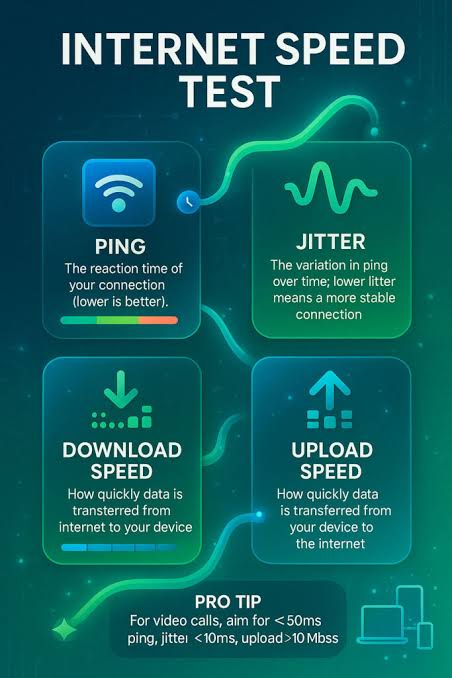
First, it sends small data packets to a nearby test server to measure ping the round-trip time in milliseconds for a signal to reach the server and return.
It repeats this several times to calculate jitter, which is the variation between those ping times; a stable connection has low jitter, while an unstable one swings wildly even if the average ping looks fine.
Next, the tool downloads a chunk of test data from the server and measures how many megabits per second (Mbps) your connection can pull in this is your download speed, the number that matters most for streaming, browsing, and downloading files.
It then reverses the process, uploading data from your device to the server to measure upload speed, which matters for video calls, cloud backups, and posting content on social media.
All of this happens directly in your browser using standard web technology, with no software installation and no app to download from the Play Store or App Store.
As the test runs, animated charts update in real time so you can watch your speed ramp up, stabilize, or fluctuate live, rather than just staring at a spinning loader.
The tool also detects your ISP name and an approximate location using your IP address, so your results are automatically labeled with useful context for example, showing whether you tested over MTN 4G in Lagos or Spectranet fibre in Abuja, without you having to type anything in.
How to Read and Understand Your Results: Mbps, Ping, and Jitter
Your results boil down to four numbers, and each tells a different part of the story.
Download speed, measured in Mbps (megabits per second), tells you how fast content flows to your device this drives how quickly a webpage loads, how fast a movie buffers, and how smooth 1080p or 4K streaming looks.
Upload speed tells you how fast data leaves your device, which affects video call quality, uploading photos or videos to Instagram and WhatsApp status, and syncing files to cloud storage like Google Drive.
Ping, measured in milliseconds (ms), reflects latency the delay before data starts moving.
A ping under 50ms is excellent for gaming and video calls, 50-100ms is generally fine for most everyday use, and anything above 150ms starts to feel laggy in real-time applications, even if your download number looks impressive.
Jitter, also in milliseconds, measures the consistency of that ping. Low jitter (under 10ms) means a stable connection; high jitter causes the stuttering, freezing, or robotic audio you sometimes experience on Zoom or WhatsApp calls even when your download speed seems healthy.
It's important to understand these numbers together, not in isolation a connection with high download speed but high jitter will still feel unreliable for calls and gaming, while a connection with modest speed but low ping and jitter can feel snappier for everyday browsing than a faster but less stable one.
Typical Internet Speeds Across Nigeria: What's Normal
Internet speeds in Nigeria differ sharply by connection type and region.
Fibre-to-the-home providers such as Spectranet, Smile, ipNX, and MTN's fibre offering can deliver anywhere from 10 Mbps to over 100 Mbps in well-served parts of Lagos, Abuja, and Port Harcourt, with generally low ping and jitter because the signal doesn't depend on radio congestion.
Mobile broadband 4G from MTN, Airtel, Glo, and 9mobile, or emerging 5G in select areas of Lagos and Abuja typically ranges from 5 Mbps to 40 Mbps depending on tower congestion, signal strength, and time of day, and tends to show higher and more variable ping than fibre.
In rural and semi-urban areas across states like Kebbi, Taraba, or parts of the South-South, connectivity often relies entirely on 3G/4G mobile signal, with speeds frequently dropping below 5 Mbps and latency spikes that make video calls difficult.
The Nigerian Communications Commission (NCC) has pushed for improved broadband penetration under the National Broadband Plan, and submarine cables landing in Lagos (such as WACS, MainOne now part of Equinix, Glo-1, and Google's Equiano cable) have improved backbone capacity, but the 'last mile' connection to homes and offices still varies wildly by neighborhood and infrastructure investment.
Power supply instability also indirectly affects speed test results nationwide, since routers, ONTs, and cell towers running on inverters or generators during outages can behave less consistently than during stable mains power.
Mobile Data vs Fixed Broadband: Which Should You Trust for Speed
Many Nigerians rely primarily on mobile data, and it's worth understanding how that compares to fixed broadband when interpreting your speed test.
Mobile networks share bandwidth among everyone connected to the same tower, so your speed can drop noticeably during peak hours typically weekday evenings from 7pm to 10pm and weekends as more people stream, chat, and browse simultaneously.
Fixed broadband, particularly fibre, offers a dedicated line into your home, so results tend to be steadier across the day and less affected by how many neighbors are online.
That said, mobile networks have improved significantly with 4G LTE-Advanced rollouts and early 5G deployment in parts of Lagos, Abuja, and Port Harcourt, sometimes outperforming older fixed wireless or DSL-based services.
If you use both, it's genuinely useful to run this speed test on your Wi-Fi and again on mobile data (with Wi-Fi switched off) to compare them directly you might discover your mobile data is actually faster than your home broadband at certain times, which could influence whether you rely on a MiFi/mobile hotspot as backup or as your primary connection.
Dual-SIM phones and mobile routers that support failover between MTN, Airtel, Glo, and 9mobile are increasingly common precisely because no single network guarantees consistent speed everywhere in the country.
Comparing Nigerian ISPs: What the Numbers Really Mean
No single ISP is universally 'the fastest' in Nigeria performance depends heavily on your exact location, the local infrastructure investment, and network congestion at your specific tower or fibre node.
Rather than relying on marketing claims, the most reliable way to compare providers is to test consistently: run this speed test at the same time of day, on the same device, over a few days, for each ISP or plan you're considering.
If you're choosing between MTN, Airtel, Glo, and 9mobile for mobile data, pay attention not just to the download number but to ping and jitter, since these reveal how the network behaves under real-world load, not just in ideal lab conditions.
For fixed broadband, compare fibre providers like Spectranet, Smile, ipNX, Tizeti (Wi-Fi. com. ng), and Coollink by testing during evening peak hours, when true capacity limitations show up most clearly.
It's also worth checking whether your ISP is delivering the specific plan you're paying for if you subscribed to a '20 Mbps' package but consistently test below 10 Mbps over several days and multiple times, that's solid evidence to raise with customer support or the Nigerian Communications Commission if the issue persists unresolved.
Businesses in particular should test speeds at different points during the workday, since office routers, VPNs, and multiple simultaneous users can mask or worsen the true speed your ISP delivers to the building.
Practical Tips to Improve Your Speed Test Results
Several fixable factors commonly drag down speed test results, and addressing them can make a real difference before you blame your ISP.
Start by moving closer to your router or, better yet, connecting via an Ethernet cable Wi-Fi signal weakens with distance and is easily disrupted by walls, other electronics, and neighboring Wi-Fi networks in densely built-up areas common in Nigerian cities.
Restart your router and modem periodically, since they can develop performance issues after running continuously for weeks, especially with the frequent power interruptions many households experience.
Check how many devices are actively using your connection smart TVs downloading updates, phones backing up photos, or someone else in the house streaming HD video can all silently eat your bandwidth during a test.
If you're on mobile data, make sure you have strong signal bars and try moving near a window or outdoors, since thick concrete walls common in Nigerian building construction can significantly weaken 4G and 5G signals indoors.
Close background apps and browser tabs that might be uploading or downloading data during the test, and disable any active VPN, since VPNs route your traffic through additional servers that add latency and can cap your true speed.
Finally, test at different times of day to build a realistic picture a single test at 2am on a quiet network isn't representative of what you'll experience during evening peak hours when the network is busiest.
Troubleshooting a Slow or Unstable Connection
If your speed test consistently comes back slower than expected, work through the likely causes systematically.
First, isolate whether it's a Wi-Fi problem or an ISP problem by running the test with a cable plugged directly into your router or ONT if the wired result is much faster than Wi-Fi, the fix is in your home network setup, not your provider.
Check for router placement issues: routers tucked inside cabinets, behind TVs, or in corners of the house lose significant range compared to a centrally located, elevated position.
If you're using a mobile hotspot or MiFi device, battery-saving modes and device overheating (common in Nigeria's warm climate) can throttle performance, so keep the device ventilated and charged.
Persistent slowness at specific times of day, especially evenings, usually points to network congestion on your ISP's side rather than your equipment, and switching to off-peak usage or asking your ISP about local capacity upgrades may help.
If you're experiencing outages tied to power cuts, note that even with an inverter or generator, routers can take a minute or two to fully re-establish a stable connection after power is restored, so don't judge a test taken immediately after a power interruption.
For DSL or older fixed-wireless connections showing high jitter, check that your cabling and connectors aren't damaged or corroded, since humidity and heat can degrade physical connections over time.
If none of this resolves the issue and multiple tests over several days confirm the problem, you have concrete data to bring to your ISP's support team or, if unresolved, to escalate to the Nigerian Communications Commission's consumer complaints channel.
Speed Test for Gaming, Streaming, and Remote Work in Nigeria
Different online activities have very different speed and latency requirements, so 'good enough' depends entirely on what you're doing.
For streaming platforms like Netflix, Showmax, or YouTube in HD, aim for at least 5-10 Mbps download with reasonably low jitter to avoid buffering; 4K streaming needs closer to 25 Mbps.
Online gaming, increasingly popular among Nigerian gamers on titles like FIFA, Call of Duty Mobile, and PUBG, depends far more on ping and jitter than raw download speed a ping above 100-150ms introduces noticeable input lag, and jitter causes the frustrating rubber-banding effect where your character seems to teleport.
Video conferencing tools like Zoom, Google Meet, and Microsoft Teams, essential for Nigeria's growing remote workforce, generally need at least 2-4 Mbps upload and download with ping under 100ms for smooth two-way audio and video; poor upload speed specifically is often why your video freezes for others even though you can see them fine.
If you work with large files architects, video editors, developers pushing code, or anyone using cloud storage upload speed and connection stability matter as much as download speed, since a single large upload can take hours on a connection with poor upload bandwidth.
Running this speed test before an important video interview, live stream, or online exam can save you from mid-session connection failures by giving you time to switch networks, move closer to your router, or activate a mobile hotspot backup in advance.
Speed Test on Different Devices: Phones, Laptops, and Smart TVs
Your results can vary depending on which device you test from, and understanding why helps you troubleshoot accurately. Older smartphones and budget Android devices common across Nigeria may have older Wi-Fi chipsets (like Wi-Fi 4/802.
11n) that cap your maximum achievable speed regardless of how fast your ISP connection actually is, while newer phones and laptops with Wi-Fi 5 or Wi-Fi 6 support can take fuller advantage of a fast fibre connection.
Testing on a laptop connected via Ethernet cable typically gives you the most accurate read of your ISP's true delivered speed, since it removes both Wi-Fi variability and mobile network conditions from the equation entirely.
If you primarily stream on a smart TV or use a set-top box, it's worth testing on a phone or laptop near the TV's location, since smart TVs often have weaker Wi-Fi antennas than phones or laptops and may show artificially low speeds that don't reflect your actual internet plan.
Browser choice can matter too modern browsers like Chrome, Firefox, and Edge handle the test's real-time data transfer most efficiently, so if you're testing on an older or lesser-known mobile browser and seeing unusually low results, try switching browsers before assuming your connection itself is the problem.
Because this tool runs entirely in-browser with no installation required, it's easy to quickly cross-check results across every device in your home or office to identify whether a slowdown is device-specific or affects your whole network.
Data Costs and Speed: Getting the Most From Your Plan
For many Nigerian users, data affordability is as important as raw speed, and understanding this relationship helps you choose plans wisely.
Mobile data bundles from MTN, Airtel, Glo, and 9mobile are typically priced by data volume (GB) rather than speed, meaning a faster connection lets you accomplish more stream longer, download quicker, load pages faster within the same data cap, effectively making your bundle stretch further.
Fixed broadband plans, by contrast, are usually priced by speed tier, so testing regularly helps confirm you're not overpaying for a higher tier than your equipment or usage actually needs, or conversely, that you're not stuck on a lower tier than your household requires for everyone to stream and work online simultaneously.
Unlimited or capped fibre plans from providers like Spectranet and Smile can be especially cost-effective for households with multiple heavy users, since speed rather than data volume becomes the limiting factor.
If you regularly hit data caps quickly on mobile, running a speed test can also reveal whether background apps are silently consuming bandwidth at high speed without your knowledge, since a fast connection can burn through a data bundle much quicker than a slow one if apps are left auto-updating or auto-playing video in the background.
Being deliberate about testing and monitoring both speed and data usage together gives you a fuller picture of value for money than looking at either number alone.
Frequently Asked Questions
Is this speed test really free and safe to use in Nigeria?
Yes. The tool runs entirely in your browser with no downloads, no app installs, and no sign-up. It does not collect personal data beyond your approximate location and ISP name, both of which are only used to display your results.
Why is my speed test result different from what my ISP advertises?
Advertised speeds are best-case figures. Actual results depend on network congestion, distance to the server, Wi-Fi interference, and how many devices are sharing your connection. Running the test on a wired connection close to your router gives the most accurate picture.
What is a good internet speed for streaming and video calls in Nigeria?
For smooth HD streaming you need at least 5-10 Mbps download, and for video calls on Zoom or Google Meet you want 2-4 Mbps in both directions with ping under 100ms. 4G and fibre users in Lagos, Abuja, and Port Harcourt often exceed this comfortably.
Why does my mobile data speed test show different results at different times of day?
Mobile networks like MTN, Airtel, Glo, and 9mobile get congested during peak hours (evenings and weekends) when more subscribers share the same tower. Testing at different times helps you understand your realistic average speed, not just the best case.
What does ping and jitter mean in my speed test result?
Ping is the time in milliseconds it takes data to travel to a server and back; lower is better, especially for gaming and video calls. Jitter measures how much that ping time varies high jitter causes choppy calls and laggy games even if your download speed looks fine.
Should I test on Wi-Fi or with a cable connected directly to my router?
A cabled connection gives you the true speed your ISP is delivering, since it removes Wi-Fi interference from walls, distance, and other devices. If your Wi-Fi result is much lower than your wired result, the problem is your router setup, not your ISP.
Which Nigerian ISP gives the fastest speeds?
It varies by location. Fibre providers like Spectranet, Smile, and MTN fibre generally beat mobile 4G/5G for consistency, while MTN and Airtel often lead on mobile broadband speed depending on your state. Running tests on different networks in your area is the only reliable way to compare.
Why is my upload speed so much lower than my download speed?
Most Nigerian broadband and mobile plans are designed asymmetrically, prioritizing download speed for browsing and streaming over upload speed. This is normal, but if you frequently upload large files or livestream, look for a plan with better upload allocation.
Can I run a speed test on my phone using mobile data?
Yes, the tool works on any smartphone browser over 4G, 5G, or Wi-Fi without installing an app. This makes it easy to compare your home Wi-Fi speed against your MTN, Airtel, Glo, or 9mobile mobile data speed side by side.
Why does my speed test fail or keep loading in some parts of Nigeria?
This usually points to an unstable connection, low signal in rural or peri-urban areas, or heavy network congestion. Try moving closer to your router or window for better signal, or switch to a different SIM/network to isolate whether the issue is your ISP or your device.