 Free Speed Test for Malawi: Check Your Real Internet Speed Now
Multi opens several parallel connections (closer to real-world browsing/streaming). Single uses one connection (shows the ceiling of a single stream/download).
Press GO to start your free speed test.
Your Network Details
Approximate location based on your public IP address not your precise GPS position.
Your Test History
| Time | Download (Mbps) | Upload (Mbps) | Ping (ms) | Jitter (ms) |
|---|
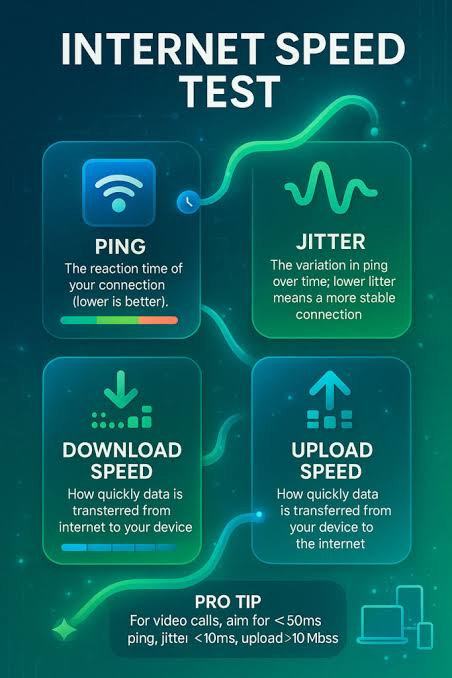
Whether you're on TNM, Airtel Malawi, Skyband, or Malawi Telecommunications Limited (MTL), this free browser-based speed test gives you an accurate, real-time picture of your download speed, upload speed, ping, and jitter no downloads, no sign-up, no hidden catches.
Key Takeaways
- Internet connectivity in Malawi has grown enormously over the past decade, but the actual quality of that connection still varies wildly depending on where you live, which network you use, and even the time of day.
- This tool runs entirely inside your web browser using modern JavaScript, meaning nothing is installed on your phone or computer and nothing lingers behind after you close the tab.
- Speed results are shown in megabits per second, written as Mbps, which measures how many millions of bits of data your connection can move every second.
- While download and upload speed measure capacity, ping and jitter measure responsiveness, and both are critical if you use real-time applications.
- Malawi's internet infrastructure has expanded significantly with investment in fibre backbone links connecting major cities like Lilongwe, Blantyre, Mzuzu, and Zomba, alongside growing 4G mobile network coverage from the country's mobile operators.
- Malawi's connectivity market is served by a mix of mobile network operators and fixed-line or fixed-wireless providers, and performance among them differs by area rather than uniformly nationwide.
- For the majority of internet users in Malawi, mobile data via TNM or Airtel is the primary and often only connection available, and for good reason: it requires no installation, no long-term contract, and lets you top up bundles as needed, which suits variable incomes and usage patterns well.
- Before blaming your ISP, there are several practical steps that reliably improve real-world speed test results in Malawi.
Why Run a Speed Test in Malawi
Internet connectivity in Malawi has grown enormously over the past decade, but the actual quality of that connection still varies wildly depending on where you live, which network you use, and even the time of day.
A speed test is the single fastest way to cut through marketing claims and see exactly what you're getting.
If a video keeps buffering during a Zoom lecture in Zomba, if uploads to a client in Blantyre keep timing out, or if your home Wi-Fi in Lilongwe feels sluggish every evening, a speed test gives you hard numbers instead of guesswork.
Those numbers matter for practical reasons: they let you hold your ISP accountable against the package you're paying for, they help you decide whether a problem sits with your provider or your own router, and they arm you with evidence when you call customer support.
For freelancers, remote workers, students doing online coursework, and small businesses running mobile money or e-commerce operations, knowing your true speed isn't a curiosity it's essential to planning your workday around network conditions.
Running a quick test before an important video call or a large file upload can save you from an embarrassing dropped connection at the worst possible moment.
Because mobile data remains the primary way most Malawians connect to the internet, and because mobile signal quality can change from one street corner to the next, testing regularly rather than once is the only way to build a realistic picture of your actual service.
How the Speed Test Actually Works
This tool runs entirely inside your web browser using modern JavaScript, meaning nothing is installed on your phone or computer and nothing lingers behind after you close the tab.
When you press start, the test first measures ping by sending small data packets to a nearby server and timing how long the round trip takes in milliseconds this is your latency.
It then sends a rapid burst of these same small packets to calculate jitter, which is the variation between consecutive ping times rather than the ping itself.
Once latency is established, the tool opens multiple parallel connections and downloads chunks of data as quickly as your connection allows, measuring throughput continuously and plotting it on an animated chart so you can watch your speed rise, stabilize, or fluctuate in real time rather than just seeing a single final number.
The same process then runs in reverse for the upload test, sending data from your device to the server to measure how quickly you can push information out.
Throughout the process, the tool also reads network metadata available to your browser to identify your internet service provider and estimate your approximate location, which is why you'll see your ISP's name and general region displayed alongside your results.
Because everything happens client-side in real time, the test reflects the exact conditions of your connection at that exact moment including any congestion, interference, or throttling rather than a cached or simulated result.
Understanding Your Download and Upload Speed (Mbps)
Speed results are shown in megabits per second, written as Mbps, which measures how many millions of bits of data your connection can move every second.
Download speed tells you how quickly data travels from the internet to your device, which governs everything from how fast web pages load to whether a movie streams without buffering.
Upload speed tells you how quickly data travels from your device out to the internet, which matters for sending emails with attachments, backing up photos, posting videos on social media, and joining video calls where your camera and microphone need to transmit continuously.
In Malawi, most home and mobile packages are asymmetric, meaning download speed is deliberately provisioned much higher than upload speed because typical household usage streaming, browsing, downloading apps consumes far more download capacity than upload.
A useful way to read your numbers: under 5 Mbps download is workable for browsing and messaging apps but will strain video streaming; 5-15 Mbps comfortably handles single-device HD streaming and video calls; 15-50 Mbps supports multiple devices and higher-definition content simultaneously; and above 50 Mbps is generally enough for a busy household or small office running several devices, cloud backups, and video conferencing at once.
Remember that Mbps is not the same as megabytes per second (MBps) used for file sizes divide your Mbps result by roughly 8 to estimate the actual megabyte download speed of a file transfer, which explains why a 'fast' connection can still take a while to download a large file.
Reading Ping and Jitter: Why Low Numbers Matter
While download and upload speed measure capacity, ping and jitter measure responsiveness, and both are critical if you use real-time applications. Ping, measured in milliseconds, is the time it takes for a small signal to travel from your device to a server and back.
A ping under 30ms is excellent and typical of a good fixed fibre or fast fixed-wireless connection close to a well-connected exchange; 30-80ms is good and generally unnoticeable for calls and browsing; 80-150ms starts to introduce a slight but perceptible delay in video calls and online gaming; and anything above 150-200ms, which is common on some mobile connections in Malawi's more remote areas, will cause noticeable lag, talk-over delays on calls, and frustrating response times in real-time games.
Jitter, also measured in milliseconds, captures how consistent that ping is over time rather than its absolute value.
A connection with a ping of 60ms and jitter of 2ms will feel smooth and predictable, while a connection with the same average ping of 60ms but jitter of 40ms will feel erratic, with calls cutting in and out unpredictably even though the 'average' looks fine on paper.
This is why two connections with similar advertised speeds can feel completely different in practice one is stable, the other is not.
High jitter is often a sign of network congestion, an overloaded Wi-Fi channel, or a mobile tower under heavy load during peak hours, and it's frequently the real culprit behind choppy video calls that people mistakenly blame on 'slow internet. '
Typical Internet Speeds and Connectivity in Malawi
Malawi's internet infrastructure has expanded significantly with investment in fibre backbone links connecting major cities like Lilongwe, Blantyre, Mzuzu, and Zomba, alongside growing 4G mobile network coverage from the country's mobile operators.
That said, actual speeds experienced by users still vary enormously by location and connection type.
Urban fibre and fixed-wireless subscribers in city centres can often see download speeds well above 20-50 Mbps, while mobile data users relying on 4G in urban and peri-urban areas typically see anywhere from 5-25 Mbps depending on tower congestion and signal strength.
In rural districts, where coverage frequently drops to 3G or even 2G in the most remote pockets, speeds can fall to just 1-3 Mbps, and latency tends to be higher due to greater distances from network infrastructure and backhaul links.
Malawi, being landlocked, also depends on international bandwidth routed through neighbouring countries via undersea cable landing points elsewhere in the region, which means international sites (hosted in Europe, the US, or Asia) can feel slower to reach than regionally hosted content, particularly during peak evening hours when demand spikes across the whole network.
Power supply reliability is another factor unique to the local context load shedding and power interruptions can affect the stability of home routers and local ISP infrastructure even when the underlying network capacity is fine, which is worth remembering before assuming a slow test result is purely a bandwidth issue.
Comparing ISPs in Malawi: TNM, Airtel, MTL, and Skyband
Malawi's connectivity market is served by a mix of mobile network operators and fixed-line or fixed-wireless providers, and performance among them differs by area rather than uniformly nationwide.
TNM (Telekom Networks Malawi) and Airtel Malawi are the two dominant mobile operators, both offering 4G data bundles that most residential and small business users rely on daily; their relative performance in your area depends heavily on tower density and backhaul capacity near you, which is exactly why local, repeated testing is more reliable than any nationwide claim either operator makes.
Malawi Telecommunications Limited (MTL) provides both mobile and fixed-line services and has historically been a key player in fixed broadband, particularly in urban business districts.
Skyband and other regional ISPs and fixed-wireless providers serve businesses and residential customers in Lilongwe and Blantyre with dedicated wireless or fibre links that can offer more consistent speeds than mobile data, especially during peak congestion hours, though often at a higher monthly cost.
When comparing providers, don't rely solely on advertised 'up to' speeds run this speed test on each network at the same location and same time of day if you're deciding between options, and pay close attention to ping and jitter as well as raw Mbps, since a provider with slightly lower advertised speed but far more stable jitter will often deliver a noticeably better everyday experience for calls and browsing.
Mobile Data vs Fixed Broadband: Which Suits You
For the majority of internet users in Malawi, mobile data via TNM or Airtel is the primary and often only connection available, and for good reason: it requires no installation, no long-term contract, and lets you top up bundles as needed, which suits variable incomes and usage patterns well.
Mobile data performance, however, is inherently more variable than fixed broadband because it depends on how many other users share the same tower, your physical distance from that tower, obstacles like buildings or terrain, and even weather conditions.
Fixed broadband whether delivered via fibre, ADSL-style copper, or fixed-wireless links from providers like MTL or Skyband generally offers steadier, more predictable performance because the connection isn't shared with the unpredictable churn of mobile users moving in and out of a cell's coverage, and it typically comes with a dedicated router rather than a handset acting as a hotspot.
For a household or business with multiple people working, studying, or streaming simultaneously, fixed broadband is usually the better long-term investment despite higher upfront setup costs, while mobile data remains unbeatable for flexibility, coverage in areas without fixed infrastructure, and low commitment.
Many households in Malawi sensibly use both: fixed broadband as the primary connection at home or the office, and a mobile data bundle as backup during outages or for use while travelling.
Running this speed test on both connection types from the same location will quickly show you which one is worth prioritising for your specific needs.
Tips to Improve Your Speed Test Results
Before blaming your ISP, there are several practical steps that reliably improve real-world speed test results in Malawi.
First, position yourself as close as possible to your Wi-Fi router, or better yet, connect via an Ethernet cable if you're testing on a laptop, since walls, distance, and interference from other electronic devices can significantly degrade Wi-Fi throughput even when your underlying connection is fine.
Second, close background apps and browser tabs that might be silently streaming, syncing, or downloading updates, as these compete for the same bandwidth your test is trying to measure.
Third, if you're on mobile data, check your signal bars and consider moving near a window or higher ground, since even one or two extra signal bars can noticeably change your throughput and latency.
Fourth, restart your router periodically a router that's been running continuously for weeks can develop memory issues that quietly degrade performance, and a simple power cycle often restores full speed.
Fifth, check how many devices are connected to your network at test time; smart TVs, other phones, and IoT devices left connected in the background all draw from the same shared pool of bandwidth.
Finally, test at different times of day: if you consistently see poor results only during the 7pm-10pm evening peak, that's a strong sign of network congestion on your provider's side rather than a fault with your own equipment, and it's useful evidence to share if you ever need to escalate the issue with your ISP's support line.
Troubleshooting a Slow or Inconsistent Connection
When your speed test results are consistently below what you're paying for, work through the problem systematically rather than guessing.
Start by testing with a device connected directly via Ethernet cable if possible, to rule out Wi-Fi as the cause if wired speeds are fine but Wi-Fi is poor, the issue is your router placement, an outdated router, or interference from neighbouring Wi-Fi networks on the same channel.
If wired speeds are also poor, restart your router and modem (or ONT for fibre connections) by unplugging them for a full 30 seconds, since this clears temporary faults far more often than people expect.
Next, check whether the slowdown is isolated to certain websites or applications, which usually points to an issue with that specific service rather than your connection overall, versus a slowdown across everything, which points to your local network or your ISP.
For mobile data users, toggle airplane mode on and off to force your phone to reconnect to the strongest available tower, and check whether switching between 4G and 3G in your settings changes results, as sometimes a weak 4G signal performs worse than a strong 3G one.
If jitter is unusually high while your average speed looks acceptable, suspect network congestion or an overloaded Wi-Fi channel rather than a bandwidth shortfall, and try switching your router to the 5GHz band if it supports dual-band operation, since 5GHz suffers far less interference from neighbouring networks than the more crowded 2.
4GHz band. If none of this resolves the issue and results stay poor across multiple tests at different times, you have solid evidence to raise a fault report with your ISP.
Data Usage and Testing Responsibly on Limited Bundles
Because many users in Malawi manage their internet through prepaid data bundles rather than uncapped fixed lines, it's worth understanding how much data a speed test itself consumes.
A typical test uses somewhere between 20MB and 100MB total, with faster connections using more data because they transfer more information within the same short measurement window this is simply an unavoidable side effect of accurately measuring high throughput.
If you're on a small daily or weekly bundle, it's sensible to run the test only when genuinely needed rather than repeatedly for curiosity, and to be aware that testing right before your bundle expires could use a meaningful chunk of your remaining allowance.
For those managing bundles carefully, a good practice is to run one test in the morning and one in the evening over a few days when diagnosing a problem, which gives you enough data points to spot patterns without excessive consumption.
The tool displays your results the moment each phase completes, so you can also choose to stop early once you have a clear read on ping and download speed if upload isn't relevant to what you're troubleshooting.
Getting the Most Reliable, Repeatable Results
To get results you can genuinely trust and compare over time, consistency in how you test matters as much as the test itself.
Always test from the same device and same location when trying to track whether your connection is improving or degrading, since switching between a phone and a laptop, or between rooms, introduces variables that make comparisons meaningless.
Run the test at least three times in a row and take the median result rather than a single reading, since momentary network blips can produce an outlier that doesn't represent your typical experience.
Keep a simple log date, time, download, upload, ping, and jitter especially if you're building a case to raise with your ISP about underperformance against your package; a week of consistent, well-timed data is far more persuasive than a single screenshot.
Be aware that VPNs, if you use one, will affect your results by routing traffic through an additional server, often outside Malawi, which can inflate ping and reduce throughput regardless of your actual local connection quality, so disable any VPN before testing if you want to see your raw ISP performance.
Finally, remember that a speed test measures the moment it's taken it's a snapshot, not a guarantee so treat single results as data points that build toward a pattern rather than a final verdict on your connection's overall quality.
Frequently Asked Questions
Is this speed test really free for users in Malawi?
Yes. The tool is completely free, runs directly in your browser, and never requires you to install an app, register an account, or hand over payment details. Just open the page and press start.
Why does my speed test result differ from the package my ISP sold me?
ISPs advertise theoretical maximum speeds under ideal lab conditions. Real-world results in Malawi are affected by network congestion, distance from the nearest tower or exchange, Wi-Fi interference, and how many devices share your connection at test time.
What is a good download speed for streaming and video calls in Malawi?
For smooth standard-definition streaming you need at least 3-5 Mbps, HD streaming needs 8-15 Mbps, and stable video calls on Zoom or Teams need around 3-4 Mbps of both download and upload with ping under 100ms.
Why is my upload speed so much slower than my download speed?
Most fixed and mobile packages in Malawi are asymmetric by design, meaning providers allocate far more capacity to downloading than uploading, since most household traffic is streaming and browsing rather than sending large files.
Does testing on mobile data give a different result than Wi-Fi?
Yes. Mobile results reflect your current signal strength, tower congestion, and network generation (3G/4G), while Wi-Fi results reflect your router and the fixed line feeding it, so it is normal for the two to differ significantly on the same phone.
How often should I run a speed test?
Run it a few times a day over a week if you suspect a problem, at different times including evening peak hours, and always right after any router restart, ISP fault fix, or plan upgrade to confirm the change actually took effect.
Can I use this speed test on a smartphone in rural areas of Malawi with weak signal?
Yes, the tool works on any modern mobile browser, but in low-signal rural areas expect naturally lower and more variable results, since the test measures your real connection rather than a theoretical best case.
What does a high ping or high jitter mean for gaming or calls?
High ping means noticeable delay between your action and the server's response, causing lag in games and awkward pauses in calls, while high jitter means that delay is inconsistent, which is often more disruptive than a merely high but stable ping.
Does running the speed test use a lot of my data bundle?
A single test typically uses between 20MB and 100MB depending on your connection speed, since faster connections transfer more data in the same measurement window, so be mindful if you are on a small mobile bundle.
Which ISPs in Malawi does the tool detect?
The tool automatically identifies major Malawian providers such as TNM (Telekom Networks Malawi), Airtel Malawi, Malawi Telecommunications Limited (MTL), Skyband, and other licensed fixed and mobile operators based on your connection's network information.