 Free Internet Speed Test for Mauritius Check Your Wi-Fi Speed Instantly
Multi opens several parallel connections (closer to real-world browsing/streaming). Single uses one connection (shows the ceiling of a single stream/download).
Press GO to start your free speed test.
Your Network Details
Approximate location based on your public IP address not your precise GPS position.
Your Test History
| Time | Download (Mbps) | Upload (Mbps) | Ping (ms) | Jitter (ms) |
|---|
Whether you're on Mysee fibre in Curepipe, Emtel 4G in Grand Baie, or MTML broadband in Rose Hill, our free internet speed test gives you an instant, accurate read on your download speed, upload speed, ping, and jitter no signup, no app, no waiting.
Key Takeaways
- Internet in Mauritius has changed dramatically over the past decade, with fibre broadband now reaching most urban and many rural districts, yet actual performance still varies enormously from one household to the next.
- Our tool runs entirely inside your browser using the same web technologies your phone or laptop already trusts, so there is nothing to install and no risk to your device.
- Understanding your results turns raw numbers into useful decisions.
- Mauritius has one of the more developed internet infrastructures in the Indian Ocean region, with fibre-to-the-home now widely available across Port Louis, Curepipe, Quatre Bornes, Vacoas-Phoenix, Rose Hill, and increasingly in coastal towns like Grand Baie and Flic en Flac.
- Mauritius' internet market includes several key players, each with different strengths depending on where you live and what plan you hold.
- One of the most common sources of confusion is a low speed test result that doesn't match the plan you're paying for, and very often the culprit isn't your ISP at all but your home Wi-Fi setup.
- Several straightforward changes can noticeably improve the numbers you see.
- When your speed test consistently comes back well below what your plan promises, work through the likely causes systematically.
Why Run an Internet Speed Test in Mauritius
Internet in Mauritius has changed dramatically over the past decade, with fibre broadband now reaching most urban and many rural districts, yet actual performance still varies enormously from one household to the next.
Running a speed test is the only reliable way to know what you are actually getting versus what you are paying for.
If you stream Canal+ or Netflix in the evening and the picture keeps buffering, if your video calls to family overseas keep freezing, or if downloading a large work file from Port Louis to a client abroad takes forever, a speed test turns a vague complaint into hard numbers.
Those numbers matter when you call your ISP's support line, because 'my internet feels slow' gets you nowhere, but 'my download speed drops to 3 Mbps on a 20 Mbps plan between 7pm and 10pm' gets escalated.
A speed test is also essential before committing to a new plan or provider comparing real, tested figures rather than marketing brochures helps you avoid overpaying for speed you never actually receive.
For remote workers, students following online classes, and small businesses relying on cloud tools, testing regularly is a simple habit that catches problems before they become costly disruptions.
How This Speed Test Actually Works
Our tool runs entirely inside your browser using the same web technologies your phone or laptop already trusts, so there is nothing to install and no risk to your device.
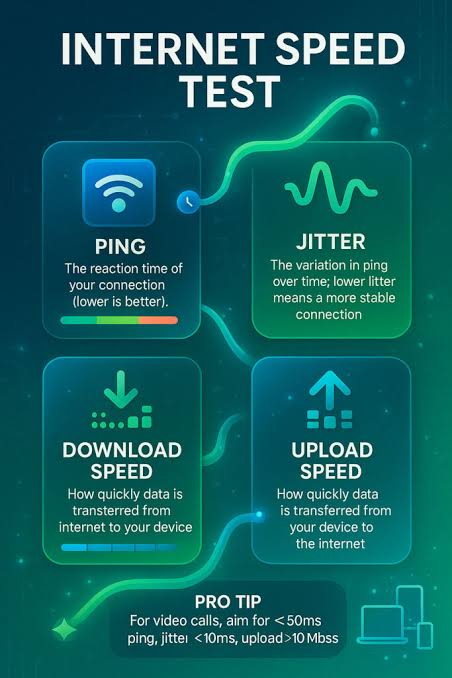
When you press start, the test first measures ping by sending a series of small data packets to a nearby test server and timing how long each round trip takes in milliseconds this reveals the latency of your connection.
Immediately after, it sends several more of these packets in quick succession to calculate jitter, which is the variation between those ping times; a stable line returns nearly identical numbers each time, while an unstable one swings wildly.
Next comes the download phase, where the tool opens multiple parallel connections and streams data from the server to your device, measuring exactly how many megabits arrive per second while accounting for natural fluctuations.
The upload phase mirrors this in reverse, pushing data from your device back to the server to measure how quickly your connection can send information out, which matters for video calls, cloud backups, and uploading photos or files.
Throughout all four stages, animated charts update in real time so you can watch your speed ramp up, stabilise, or fluctuate rather than just staring at a static number.
The entire process typically takes 20 to 40 seconds, and once finished, the tool also detects your ISP name and approximate location using your connection's public IP address, giving you full context for your results without asking for any personal information.
How to Read Your Mbps, Ping, and Jitter Results
Understanding your results turns raw numbers into useful decisions. Download and upload speeds are shown in Mbps, or megabits per second note this is different from megabytes, which is what file sizes are usually measured in, so a 50 Mbps connection downloads at roughly 6.
25 megabytes per second, not 50. For general browsing and social media, 10-25 Mbps download is comfortable; for HD streaming and video calls, aim for 25-50 Mbps; for 4K streaming, multiple simultaneous users, or heavy remote work, 100 Mbps or more gives real breathing room.
Ping, measured in milliseconds, reflects how quickly your device gets a response from a server lower is always better, with under 30ms considered excellent for gaming and video calls, 30-60ms perfectly workable, and anything above 100ms likely to cause noticeable lag or delay in real-time applications.
Jitter, also in milliseconds, shows how consistent that ping is over time; even a low average ping can feel bad in practice if jitter is high, because packets arrive unevenly, causing stutter in calls and games.
As a rule of thumb, jitter under 5ms is excellent, up to 20ms is tolerable for most uses, and above 30ms will be noticeable during real-time activities.
Reading these three figures together, rather than fixating on download speed alone, gives a far more complete and honest picture of your connection's real-world quality.
Typical Internet Speeds and the Connectivity Landscape in Mauritius
Mauritius has one of the more developed internet infrastructures in the Indian Ocean region, with fibre-to-the-home now widely available across Port Louis, Curepipe, Quatre Bornes, Vacoas-Phoenix, Rose Hill, and increasingly in coastal towns like Grand Baie and Flic en Flac.
Fibre plans commonly range from 10 Mbps entry-level packages up to 100 Mbps or higher for premium residential and business tiers, with ping to local and regional servers typically sitting in the single digits to low twenties of milliseconds thanks to the island's connection via the LION and SAFE submarine cables along with the METISS cable, which added further capacity and redundancy in recent years.
That said, older ADSL copper lines still serve some rural and outlying areas where fibre rollout hasn't fully reached, and these connections deliver noticeably lower and less consistent speeds, especially over longer distances from the local exchange.
Mobile networks have also advanced quickly, with 4G coverage now near-universal and 5G expanding in Port Louis and other high-density zones, often delivering speeds that rival or exceed fixed broadband in ideal conditions, though performance can dip sharply during peak evening hours when towers get congested.
Weather is a genuine factor too heavy cyclone-season rain and wind can degrade both fixed-line and mobile signal quality temporarily.
Understanding this landscape helps set realistic expectations: a test result of 40 Mbps on a fibre plan in Rose Hill and a 12 Mbps result on ADSL in a rural village can both be entirely normal for those respective infrastructures.
Comparing Mauritius ISPs: What the Numbers Really Tell You
Mauritius' internet market includes several key players, each with different strengths depending on where you live and what plan you hold. Mauritius Telecom, through its My.
T brand, remains the largest provider with the widest fibre footprint and legacy ADSL coverage in areas fibre hasn't yet reached, generally delivering solid, consistent speeds in serviced zones.
Emtel operates both a well-regarded fixed fibre network in select areas and a strong mobile 4G/5G network, often praised for lower latency on mobile data.
Newer and smaller ISPs have also entered the fixed broadband space with competitive fibre pricing, sometimes undercutting the incumbents on cost per Mbps, though their coverage areas can be more limited.
Rather than relying on advertised 'up to' speeds, the most useful comparison method is running this speed test at the same time of day, ideally during evening peak hours, on each provider you're considering ask friends or neighbours on different ISPs to test simultaneously if you're deciding between providers before signing a contract.
Pay attention not just to download speed but to upload speed and ping too, since some providers optimise heavily for download at the expense of the other two, which matters if you work from home or game online.
Building a small personal log of test results over a week, noting the time and day, gives a far more trustworthy comparison than any single test or marketing claim.
Wi-Fi Speed Test vs Wired Test: Which Should You Trust
One of the most common sources of confusion is a low speed test result that doesn't match the plan you're paying for, and very often the culprit isn't your ISP at all but your home Wi-Fi setup.
Running a wifi speed test measures the combined performance of your ISP connection and your local wireless network, and the two can differ substantially.
Walls, distance from the router, interference from neighbouring Wi-Fi networks (especially common in denser apartment blocks in Port Louis or Quatre Bornes), and older router hardware using outdated Wi-Fi standards can all silently cap your speed well below what your ISP is actually delivering to your home.
To isolate the true ISP-delivered speed, connect a laptop directly to your router or ONT using an Ethernet cable and run the test again; if that wired result is close to your plan's advertised speed but your Wi-Fi result is much lower, the problem sits in your home network, not with your provider.
If both wired and wireless results are low, the issue is more likely with your plan, line quality, or an ISP-side fault worth reporting.
Testing both ways periodically, especially after moving your router or adding new smart-home devices, helps you quickly diagnose exactly where a slowdown is coming from.
Practical Tips to Improve Your Speed Test Results
Several straightforward changes can noticeably improve the numbers you see. Position your router centrally and elevated, away from thick concrete walls, metal cabinets, and appliances like microwaves that interfere with the 2.
4GHz band; where possible, use the 5GHz band for devices near the router since it offers higher throughput over shorter range. Restart your router periodically, as extended uptime without a reboot can gradually degrade performance on some models.
If your router is more than four or five years old, especially one still running older Wi-Fi 4 or early Wi-Fi 5 standards, upgrading to newer hardware supporting Wi-Fi 6 can make a real difference, particularly in busier households with many connected devices.
Close bandwidth-heavy background applications, cloud backup processes, and other devices actively streaming or downloading before testing, since your speed test result reflects whatever share of bandwidth is left after everything else on your network.
Testing at different times of day is also revealing a test run at 2pm and another at 8pm on the same connection can differ significantly due to peak-hour congestion across the ISP's broader network, not just your home.
Finally, if you're on a mesh Wi-Fi system, make sure you're testing from a device connected to the nearest node rather than one several rooms and hops away, since each additional hop adds latency and reduces throughput.
Troubleshooting a Slow or Unstable Connection
When your speed test consistently comes back well below what your plan promises, work through the likely causes systematically.
Start by checking whether the slowdown affects every device or just one a single slow device points to that device's Wi-Fi adapter or settings, while a whole-house slowdown points to the router or the incoming line.
Check for physical issues next: loose or damaged cabling, an ONT or modem with error lights indicating a fault, or a router that's overheating in an enclosed cabinet.
If you're on fibre and results are poor across all devices even when wired directly to the ONT, contact your ISP to check for line faults or outages in your area, since these are sometimes localised to specific streets or buildings and not immediately visible to the provider without a report.
High jitter alongside normal average speeds often indicates Wi-Fi interference from neighbouring networks, particularly in apartment complexes with many overlapping Wi-Fi channels switching your router to a less congested channel, which most router admin panels allow you to do manually, can resolve this.
Persistent high ping on an otherwise fast connection sometimes stems from your device's own background updates or VPN software rather than the network itself, so testing with VPNs disabled and non-essential apps closed helps isolate the true cause before you escalate to your provider.
Mobile Data vs Fixed Broadband: Which Should You Rely On
Choosing between mobile data and fixed broadband, or using both strategically, depends heavily on your location and usage pattern in Mauritius.
Fixed fibre broadband generally offers more consistent speeds, lower jitter, and no data caps, making it the better choice for households with multiple people streaming, working, or gaming simultaneously, and for anyone needing dependable upload speed for video calls or cloud work.
Mobile 4G and 5G, however, has become a genuinely strong alternative in well-covered areas, offering surprisingly fast speeds and low latency, and is often the only practical option in newer developments or rural pockets where fibre hasn't yet been laid.
Many households now also keep a mobile hotspot or a secondary SIM-based router as a backup for when fixed broadband drops during a fault or planned maintenance, which is a sensible precaution given that even reliable fibre networks experience occasional outages.
Running the speed test on both your fixed connection and your mobile data separately gives you a clear, practical basis for deciding which to prioritise for demanding tasks like video conferencing or large uploads, and which is fine as a backup.
If you frequently work from cafés, co-working spaces, or while travelling around the island, testing mobile speed test results at your typical work locations, not just at home, gives a much more accurate sense of what to expect when you actually need it.
Speed Test Etiquette and Getting the Most Accurate Reading
A speed test is only as reliable as the conditions under which you run it, so a few habits make a real difference to accuracy.
Always close other tabs, applications, and connected devices that might be actively using bandwidth during the test, since a single background video call or large download elsewhere on the network can drag your result down without you realising it.
Run the test more than once and at different times, because a single reading can be affected by momentary network conditions that aren't representative of your typical experience; three or four tests across a day give a far more trustworthy average.
If you're testing specifically to diagnose a problem for a support call, take screenshots of several results along with the date, time, and whether you were on Wi-Fi or Ethernet, since ISP support teams generally respond faster and more effectively to documented, repeated evidence than to a single anecdotal test.
Be aware that test servers matter too a test connecting to a server outside Mauritius will naturally show higher ping than one connecting locally, so results are most meaningful when compared against your own previous tests using the same tool rather than against results from a different testing service entirely.
Treat the speed test as an ongoing diagnostic habit rather than a one-off check, and you'll build a genuinely useful picture of how your connection performs over time.
Frequently Asked Questions
Is this speed test really free, and do I need to install anything?
Yes, completely free with no signup, no email, and no app install. It runs entirely in your browser using modern web technology, so it works on any phone, tablet, or computer in Mauritius with an internet connection.
Why does my speed test result differ from my Mysee, Emtel, or MTML plan speed?
Your plan speed is the maximum theoretical limit, not a guarantee. Wi-Fi signal loss, network congestion during peak hours, shared household usage, and device limitations all reduce real-world results below the advertised figure.
What is a good ping for gaming and video calls in Mauritius?
Under 30ms is excellent, 30-60ms is good for most gaming and calls, and above 100ms will cause noticeable lag. Fibre connections from local ISPs typically deliver ping between 5ms and 25ms to Mauritius-based servers.
Why is my upload speed so much slower than my download speed?
Most Mauritius broadband plans, especially ADSL and older fibre packages, are asymmetric, meaning they allocate far more bandwidth to downloads than uploads. This is normal and only becomes a problem if you frequently upload large files or livestream.
Should I test on Wi-Fi or with an Ethernet cable?
For the most accurate picture of what your ISP delivers to your home, use an Ethernet cable. If you want to know what your devices actually experience day to day, testing over Wi-Fi in the room where you normally use the internet is more realistic.
Can I use this speed test on mobile data in Mauritius?
Yes, the tool works on 4G and 5G mobile connections just as well as fixed broadband. It automatically detects and displays your mobile ISP, whether that is Emtel, MTML, or Chili, along with your results.
How often should I run a speed test?
Run it whenever you notice slowdowns, after changing routers or plans, and periodically at different times of day to build a picture of peak-hour performance. Comparing several tests is more useful than relying on a single reading.
What does high jitter mean and why does it matter?
Jitter measures how much your ping fluctuates between measurements. High jitter causes choppy video calls and stuttering online games even when your average speed looks fine, and often points to Wi-Fi interference or an unstable line.