 Free Internet Speed Test for Gambia Check Your Download, Upload, Ping and Jitter Now
Multi opens several parallel connections (closer to real-world browsing/streaming). Single uses one connection (shows the ceiling of a single stream/download).
Press GO to start your free speed test.
Your Network Details
Approximate location based on your public IP address not your precise GPS position.
Your Test History
| Time | Download (Mbps) | Upload (Mbps) | Ping (ms) | Jitter (ms) |
|---|
Whether you are on Gamtel fibre in Banjul, a QCell mobile connection in Brikama, or Africell data out in Basse, this free speed test tells you exactly how fast your internet really is right now. No signup, no app, no waiting just accurate, real-time results.
Key Takeaways
- Internet access in Gambia has grown rapidly over the past few years, but the quality of that access still varies enormously depending on where you live, which provider you use, and what time of day you connect.
- This tool runs entirely inside your web browser using real, live data transfers to and from nearby test servers, so the numbers you see reflect your actual connection performance at that exact moment, not an estimate or a cached figure.
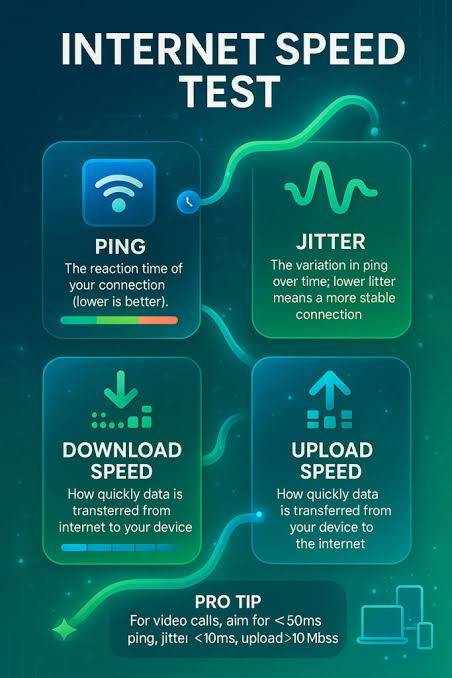
- Once your test finishes, you will see four core numbers, and understanding what each one means is key to diagnosing your connection properly.
- Gambia's internet landscape is shaped by a small number of key operators, each with different strengths depending on location.
- For most households and small businesses in Gambia, the choice is not really theoretical mobile data from QCell or Africell is often the only practical option, especially outside the main urban corridor, while fixed broadband from Gamtel or Netpage is concentrated in Banjul, Serrekunda, Bakau, and nearby areas.
- A few simple adjustments before you test can make the difference between a misleading result and one that genuinely reflects what your connection is capable of.
- If your speed test results are consistently disappointing, work through this practical checklist before assuming the worst.
- If you are deciding between providers, or trying to determine whether it is worth switching from your current mobile network or broadband package, systematic speed testing is the most objective method available to ordinary consumers.
Why Run an Internet Speed Test in Gambia
Internet access in Gambia has grown rapidly over the past few years, but the quality of that access still varies enormously depending on where you live, which provider you use, and what time of day you connect.
A speed test is the single fastest way to turn a vague feeling of "my internet feels slow" into hard numbers you can actually act on.
If you are paying for a home broadband package from Gamtel or Netpage and streaming keeps buffering, or your QCell or Africell mobile data seems to crawl during video calls, running a proper test tells you whether the problem is your connection, your device, your Wi-Fi router, or genuine network congestion upstream.
For students relying on data bundles to attend online classes, for small business owners in Serrekunda or Banjul who depend on stable uploads for mobile money transactions and cloud tools, and for remote workers handling international clients, knowing your real download speed, upload speed, ping, and jitter is not a luxury it is essential information.
A speed test also gives you leverage. If your results consistently fall far below what your ISP promised in their package, you now have evidence to raise a support ticket, request a technician visit, or consider switching providers. Without a test, you are guessing.
With one, you are informed, and informed customers get better service outcomes across Gambia's telecom market.
How This Speed Test Actually Works
This tool runs entirely inside your web browser using real, live data transfers to and from nearby test servers, so the numbers you see reflect your actual connection performance at that exact moment, not an estimate or a cached figure.
The process happens in three stages. First, it measures ping and jitter by sending a series of tiny data packets back and forth between your device and the server and timing how long each round trip takes.
Ping is the average time in milliseconds for one round trip; jitter is how much that timing varies from packet to packet.
Second, it measures download speed by pulling a temporary data stream from the server to your device and calculating how many megabits per second (Mbps) arrive over a short, controlled window, with the connection ramped up gradually so it captures your true peak throughput rather than an artificially low starting burst.
Third, it measures upload speed the same way in reverse, sending data from your device back to the server, which matters just as much as download speed if you send large files, host video calls, or back up photos to the cloud.
Throughout the test, animated charts update in real time so you can watch your speed rise, stabilize, or dip as the measurement progresses, which is often more revealing than the final number alone because it shows whether your connection is steady or prone to sudden drops.
The tool also detects your internet service provider and approximate location automatically from your connection's public IP address, so you immediately know whether you are being served by Gamtel, QCell, Africell, Netpage, or another Gambian operator, without you needing to type anything in.
How to Read Your Mbps, Ping, and Jitter Results
Once your test finishes, you will see four core numbers, and understanding what each one means is key to diagnosing your connection properly.
Download speed, measured in Mbps (megabits per second), tells you how quickly data travels from the internet to your device this is what determines how fast web pages load, how smoothly Netflix or YouTube stream, and how quickly files download.
Upload speed measures the reverse direction and matters most for video calls on Zoom or WhatsApp, uploading photos or videos to social media, sending large email attachments, and any cloud backup service.
Many Gambian broadband and mobile packages are heavily asymmetric, meaning upload speed is a fraction of download speed, which is worth checking specifically if you work from home or run live video content.
Ping, measured in milliseconds, tells you the delay before your action (like clicking a link or sending a game command) actually reaches the server and gets a response lower is always better, and anything under 50ms feels instant for most everyday use, while 100ms or higher starts to feel sluggish in real-time applications.
Jitter, also in milliseconds, measures how consistent that delay is; even if your average ping looks fine, high jitter means the timing keeps jumping around, which causes choppy audio on calls and stuttering in live video even when your download speed looks perfectly healthy.
As a rule of thumb for Gambia: 5 to 15 Mbps download is workable for single-device browsing and standard-definition streaming, 25 Mbps and above comfortably supports HD streaming and multiple devices, and anything below 3 to 5 Mbps will struggle with video calls or HD content altogether.
Typical Internet Speeds and ISPs in Gambia
Gambia's internet landscape is shaped by a small number of key operators, each with different strengths depending on location.
Gamtel, the state-owned incumbent, provides both fixed broadband and mobile services and remains a major player particularly in Banjul, Kanifing, and surrounding urban areas, with fibre-backed connections increasingly available in denser neighborhoods.
QCell and Africell are the dominant mobile network operators and, for the majority of Gambians, mobile data is the primary or only way they access the internet, since fixed-line broadband penetration remains relatively low outside the Greater Banjul Area.
Speeds on 4G mobile networks in well-covered urban zones can reasonably reach 10 to 30 Mbps download under good conditions, while rural and semi-urban areas along the North and South Bank regions, and towns further from Banjul like Basse or Farafenni, often see noticeably lower and less consistent speeds due to greater distance from cell towers and less network capacity.
Gambia's international connectivity relies on undersea fibre-optic cable systems linking the country to the wider internet backbone, primarily routing traffic through West African and European exchange points, which is why ping times to international servers (used by many apps and games hosted abroad) tend to run higher than what users in Europe or North America experience.
Local content and services hosted on servers within West Africa or cached locally by major platforms will generally show noticeably better ping and speed than services hosted further away.
Understanding this geography helps set realistic expectations: if your download speed test shows 15 Mbps to a nearby regional server but a video call to someone in the US feels laggy, the international routing distance, not your local connection, is often the bigger factor.
Mobile Data vs Fixed Broadband: Which Should You Test and Trust
For most households and small businesses in Gambia, the choice is not really theoretical mobile data from QCell or Africell is often the only practical option, especially outside the main urban corridor, while fixed broadband from Gamtel or Netpage is concentrated in Banjul, Serrekunda, Bakau, and nearby areas.
Each has distinct performance characteristics worth testing separately rather than assuming one number applies to both.
Mobile data speeds fluctuate far more than fixed lines because they are affected by how many devices are connected to the same cell tower, your physical distance from that tower, obstacles like buildings, and even weather.
A speed test run at your desk over Wi-Fi at 8am might show excellent numbers, while the same phone on mobile data at a busy taxi park at 6pm could show a fraction of that speed due to network congestion.
Fixed broadband, once installed, tends to be more stable because it is not sharing radio spectrum with hundreds of nearby users the way mobile towers do, but it is far more sensitive to router placement, cable quality, and the number of devices connected to your home Wi-Fi simultaneously.
If you rely on mobile data as your main connection, it is worth running this speed test at multiple points in your day, including peak hours, to understand the realistic range you are working with rather than judging your connection off a single lucky test.
If you have both options available, comparing their results side by side using this same tool gives you a genuinely useful basis for deciding which to prioritize for which task mobile data for on-the-go browsing and messaging, fixed broadband for video calls, large downloads, and any work requiring a stable connection.
Tips to Get More Accurate and Better Speed Test Results
A few simple adjustments before you test can make the difference between a misleading result and one that genuinely reflects what your connection is capable of.
First, close other apps and browser tabs that might be using bandwidth in the background, particularly cloud backup services, streaming apps, or auto-updating software, since these silently eat into your available speed during the test.
Second, if you are testing Wi-Fi, sit as close to your router as reasonably possible and, where feasible, use a device connected directly by ethernet cable for the most accurate baseline reading of what your line is actually delivering, since Wi-Fi signal strength and interference from walls or other electronic devices can significantly understate your true speed.
Third, restart your router before testing if you have not done so in a while, as routers that have been running continuously for weeks can develop performance degradation that a simple power cycle resolves.
Fourth, be mindful of how many other people or devices are sharing your connection at the moment of testing a household with multiple phones streaming video simultaneously will see very different numbers than a quiet early morning test.
Fifth, run the test more than once and at different times of day rather than relying on a single result, since Gambia's networks, like most developing telecom infrastructure, show real variation between off-peak hours (early morning, late night) and peak hours (evening, especially 7pm to 11pm when households are home and online).
Finally, if you are on mobile data, check your signal bars and, if possible, move closer to a window or outdoors, since building materials common in Gambian construction can meaningfully weaken indoor mobile signal strength.
Troubleshooting a Slow Connection in Gambia
If your speed test results are consistently disappointing, work through this practical checklist before assuming the worst.
Start by testing at a different time of day if speeds are fine at 7am but poor at 8pm, the issue is likely network congestion during peak hours rather than a fault with your line or device, and this is extremely common across Gambian mobile and fixed networks alike.
Next, check whether the problem is isolated to Wi-Fi or affects a wired connection too; if a device plugged directly into your router or modem gets good speeds but Wi-Fi devices do not, the issue is your router's placement, age, or configuration rather than your actual internet service.
Reboot your router and, if you have one, your modem, leaving them powered off for a full 30 seconds before restarting, since this clears temporary memory issues that build up over weeks of continuous operation.
If you are on mobile data, toggle airplane mode on and off, or manually reselect your network, to force your phone to reconnect to the strongest available tower signal.
Check how many devices are connected to your network at once smart TVs, other phones, laptops, and even background app updates on devices you are not actively using can quietly consume a large share of your bandwidth.
If none of this improves your results and your speed test numbers remain far below what your package promises across multiple tests and times of day, that is the point to contact your ISP's customer support directly, armed with your test results (download, upload, ping, and jitter, plus the time and date of each test) as concrete evidence rather than a vague complaint, which tends to get faster and more useful responses from support teams.
Comparing ISPs in Gambia Using Speed Test Results
If you are deciding between providers, or trying to determine whether it is worth switching from your current mobile network or broadband package, systematic speed testing is the most objective method available to ordinary consumers.
Rather than relying on marketing claims or a single friend's anecdote, run this test multiple times across a full week on each connection you are comparing, ideally at similar times of day so the comparison is fair, and note the download speed, upload speed, ping, and jitter for each session.
Averaging results across several tests smooths out one-off anomalies, like a moment of unusual congestion or a temporary fault, and gives you a much more reliable picture of what each provider actually delivers in your specific location, since coverage quality for Gamtel, QCell, and Africell can differ meaningfully street by street, not just region by region.
Pay particular attention to consistency, not just peak speed a provider that delivers a steady 10 Mbps with low jitter is often more useful day to day than one that occasionally spikes to 25 Mbps but frequently drops to near zero, especially for video calls, mobile money transactions, and other tasks that need a stable connection rather than a high ceiling.
If you run a small business, testing at your actual business premises rather than relying on speeds you experienced elsewhere is essential, since indoor building materials, distance from the nearest tower or exchange, and local congestion all vary by exact address.
Keep a simple log of your results with dates and times; this record becomes invaluable both for choosing the right provider and for holding your eventual choice accountable to the service level it advertises.
Understanding Data Usage When You Test and Browse
Because many users in Gambia manage their internet through prepaid data bundles rather than unlimited fixed-line plans, it is worth understanding how much data a speed test itself consumes, and how that compares to everyday activities.
A single speed test typically uses somewhere between 20 and 100 megabytes, with faster connections consuming more data because they transfer more information within the same measurement window this is a small, one-time cost worth paying for the clarity it provides, especially before making a decision like upgrading your bundle size or switching providers.
For context, that is roughly comparable to a few minutes of standard-definition video streaming or loading a handful of image-heavy web pages, so it will not meaningfully dent a typical data bundle.
If you are extremely conscious of data usage, it is best to run the test over Wi-Fi where available rather than mobile data, and to avoid running it repeatedly in quick succession beyond what you actually need to get a reliable reading two or three tests spread across different times of day give you far more useful information than ten tests run back to back in the same hour, which will largely just consume data while telling you the same thing about current network conditions.
Speed Test for Remote Work, Online Learning, and Mobile Money in Gambia
Beyond casual browsing, an increasing number of Gambians depend on a stable internet connection for genuinely important, time-sensitive activities, and knowing your real speed profile helps you plan around its limitations rather than being caught out by them.
Remote workers handling international clients need reliable upload speed for video calls and file sharing far more than they need high download speed, so if your test shows strong download but weak upload, that asymmetry is worth flagging to your ISP or factoring into how you schedule client calls.
Students attending online classes or accessing e-learning platforms benefit most from low ping and low jitter, since these determine whether a live video lecture stays smooth or constantly freezes and lags, even if the raw download number looks acceptable on paper.
Anyone relying on mobile money platforms and banking apps for transactions should be aware that these services are generally lightweight in terms of data use but very sensitive to connection drops mid-transaction, so testing your mobile data reliability, not just its peak speed, during the hours you typically transact is genuinely useful practical knowledge.
If your work or studies are consistently disrupted by unreliable internet, this speed test's real-time charts are particularly valuable because they reveal whether your connection dips and recovers repeatedly during a session, which is often the true cause of dropped calls and failed transactions even when a spot-check test shows a perfectly reasonable average speed.
Frequently Asked Questions
Is this speed test really free to use in Gambia?
Yes, completely free. There is no signup, no app download, and no hidden charges. Open the page in any browser on your phone or computer, tap start, and get your download, upload, ping, and jitter results in under a minute.
Why is my speed test result lower than what my ISP advertises?
Advertised speeds from providers like Gamtel, QCell, or Africell are theoretical maximums under ideal conditions. Real-world results depend on network congestion, Wi-Fi signal strength, device capability, and how many people are sharing your connection at that moment.
Does the speed test use a lot of my mobile data bundle?
A single test typically uses between 20 and 100 MB depending on your connection speed, since faster connections transfer more data in the same test window. If you are on a tight data bundle, run the test over Wi-Fi where possible.
What is a good ping for gaming or video calls in Gambia?
For smooth video calls and casual gaming, aim for ping under 50ms. Competitive online gaming ideally needs under 30ms. Because most international traffic from Gambia routes through undersea cables to Europe, pings of 60 to 120ms to foreign servers are common and normal.
Why do my results change between morning and evening tests?
Internet speed in Gambia fluctuates with network load. Evenings, especially between 7pm and 11pm when households stream video and browse social media simultaneously, often show slower speeds than early morning due to shared bandwidth congestion at the ISP level.
Should I test on Wi-Fi or mobile data to know my true speed?
Test both separately if you want a full picture. Wi-Fi results reflect your router and fixed broadband line, while mobile data results reflect your SIM network (QCell, Africell, or Gamcel). They often differ significantly, especially outside Banjul and Serrekunda.
Can I use this speed test on a basic smartphone with limited data?
Yes. The tool runs directly in your mobile browser without needing to install any app, which is ideal for budget Android phones common in Gambia. Just make sure your browser is reasonably up to date for accurate results.
How often should I run a speed test?
Test at different times of day for about a week if you suspect a persistent problem, and always test right before contacting your ISP so you have current evidence of the download, upload, ping, and jitter numbers to report.