 Free Internet Speed Test for Ireland
Multi opens several parallel connections (closer to real-world browsing/streaming). Single uses one connection (shows the ceiling of a single stream/download).
Press GO to start your free speed test.
Your Network Details
Approximate location based on your public IP address not your precise GPS position.
Your Test History
| Time | Download (Mbps) | Upload (Mbps) | Ping (ms) | Jitter (ms) |
|---|
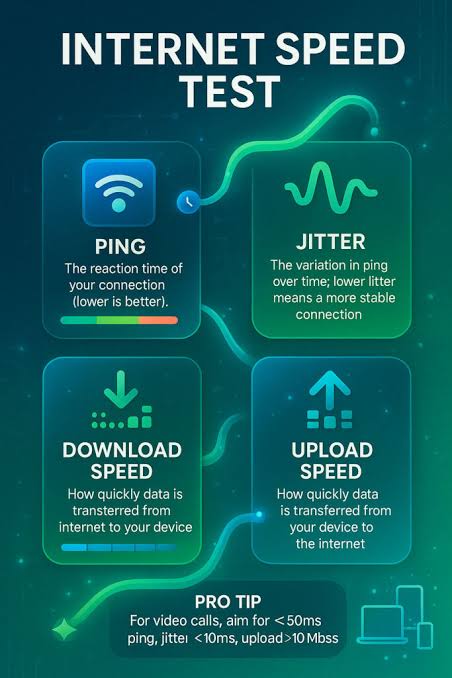
Whether you're on eir fibre in Dublin, Virgin Media cable in Cork, or 4G in rural Galway, our free speed test gives you a precise, real-time read on your connection download speed, upload speed, ping, and jitter straight in your browser, with no app to install and no account to create.
Key Takeaways
- Irish households now depend on their broadband for far more than email and browsing.
- Our tool runs entirely in your browser using modern web technology, which means there's nothing to download and nothing left behind afterwards.
- The results screen can look like a wall of numbers if you don't know what you're looking at, so here's what each figure actually tells you.
- Ireland's connectivity landscape has changed rapidly.
- A few small adjustments before you test make a real difference to accuracy.
- It's common to run a wifi speed test and see a noticeably lower result than the plan you're paying for, even though a wired test from the same router shows the full speed.
- If your results are consistently below what you'd expect, work through the likely causes in order rather than assuming it's your ISP's fault straight away.
- Broadband comparison sites and provider marketing give you advertised maximum speeds, but your own test results tell you what a provider actually delivers on your street, in your house, at the times you actually use the internet.
Why Run an Internet Speed Test in Ireland
Irish households now depend on their broadband for far more than email and browsing. Remote and hybrid work, video calls with colleagues abroad, streaming in 4K on multiple TVs, online gaming, and smart home devices all pull on the same connection at once.
A speed test is the fastest way to see what your line is actually delivering right now, rather than what the box on your router promises.
If you've ever had a Zoom call freeze during a meeting, a Netflix stream buffer during peak evening hours, or a game lag at the worst possible moment, a quick test tells you whether the problem sits with your ISP, your router placement, or your home network.
Running a test also matters when you're shopping around. Ireland's broadband market has shifted dramatically over the past few years, with full-fibre rollout from eir, SIRO, and the National Broadband Ireland scheme reaching areas that previously relied on slow DSL or fixed wireless.
Before you switch provider or upgrade your plan, a baseline speed test tells you exactly what you're leaving behind and what improvement you can realistically expect.
It's also useful evidence: if your speeds are consistently and significantly below what you're paying for, a documented series of test results is exactly what you need when raising the issue with your provider or with ComReg, Ireland's telecoms regulator.
How This Speed Test Actually Works
Our tool runs entirely in your browser using modern web technology, which means there's nothing to download and nothing left behind afterwards.
When you press start, the test first measures ping and jitter by sending a series of very small data packets to a nearby test server and timing how long each round trip takes.
Ping is reported in milliseconds and reflects the raw latency of your connection; jitter is calculated from the variation between those individual ping measurements, which matters enormously for anything happening live, like a voice call or a multiplayer game.
Once latency is established, the test moves into the download phase.
It opens multiple parallel connections to the server and streams data to your device, measuring throughput continuously rather than as a single average, which is why you see the animated chart climb and settle in real time rather than jump straight to a final number.
This mirrors how real-world traffic behaves, since your device rarely pulls data through a single stream when browsing or streaming.
The upload phase works the same way in reverse, pushing data from your browser to the server to measure how quickly you can send information outward critical for video calls, cloud backups, and uploading large files.
Throughout the process, the tool also identifies your ISP and an approximate location using your connection's network information, so you get context alongside the raw numbers without needing to enter anything manually.
Understanding Your Mbps, Ping, and Jitter Results
The results screen can look like a wall of numbers if you don't know what you're looking at, so here's what each figure actually tells you.
Download speed, shown in Mbps (megabits per second), is how fast data travels from the internet to your device this is what determines how quickly a webpage loads, how smoothly a stream plays, and how fast a file downloads.
Upload speed is the mirror image: how fast data moves from your device out to the internet, which matters for video calls, sending large email attachments, uploading photos or videos, and cloud syncing services like Google Drive or OneDrive.
Most home connections in Ireland are asymmetric, meaning download speed is considerably higher than upload speed, which is normal for cable and older DSL lines but increasingly less true on full-fibre connections that offer symmetric or near-symmetric speeds.
Ping, measured in milliseconds, tells you the delay between your action and the server's response lower is always better, and anything under 30ms is excellent, 30-60ms is good for most uses, and above 100ms starts to feel noticeably sluggish for gaming or calls.
Jitter measures the consistency of that ping over time; even a low average ping can feel poor if jitter is high, because packets arrive erratically rather than steadily, causing choppy audio or stuttering video.
When you review your results, look at all four figures together rather than fixating on download speed alone a connection with high download but high ping and jitter will still feel frustrating for real-time applications.
Typical Broadband Speeds and ISPs Across Ireland
Ireland's connectivity landscape has changed rapidly.
Urban areas Dublin, Cork, Limerick, Galway, and Waterford now have widespread access to full-fibre broadband from eir, SIRO (delivered through partners like Vodafone and Sky), and Virgin Media's cable network, with plans commonly ranging from 150 Mbps up to 1 Gbps (1000 Mbps) download.
In these areas, a well-configured connection tested over Ethernet should come close to the advertised plan speed. Commuter towns and larger regional centres are increasingly covered too, as fibre build-out continues year on year. Rural Ireland tells a more mixed story.
The National Broadband Plan, delivered through National Broadband Ireland (NBI), has been rolling out fibre to premises that were previously stuck on slow copper DSL or entirely dependent on fixed wireless access and satellite services.
If you're in one of these areas and haven't been reached yet, don't be surprised to see download speeds well under 30 Mbps on a legacy connection, whereas an NBI fibre connection once installed typically delivers 150-500 Mbps or more.
It's worth checking the NBI rollout map for your townland, because many areas that were considered unreachable a few years ago are now fibre-ready.
Mobile network coverage from Three, Vodafone, eir, and Virgin Media Mobile (via the Three network) also varies by region, with 5G now common in cities and larger towns but patchier along the west coast and in mountainous areas.
Whatever your setup, this speed test gives you the real, current picture rather than relying on marketing figures or what a neighbour reports.
How to Get the Most Accurate Speed Test Result
A few small adjustments before you test make a real difference to accuracy.
First, close any other applications or browser tabs that might be using bandwidth in the background cloud backups, software updates, streaming services, and even browser extensions can quietly consume data while you test.
Second, pause downloads on other devices in the house; if someone else is streaming in 4K or a games console is mid-update, your result will reflect the shared, reduced capacity rather than your true line speed.
Third, wherever possible, connect your device directly to the router with an Ethernet cable rather than over wifi.
Wifi introduces variables distance, walls, interference from neighbouring networks, and the capabilities of your device's wireless adapter that have nothing to do with the speed your ISP is actually delivering.
If a wired test isn't possible, at least sit close to the router with a clear line of sight. Fourth, test at more than one time of day.
Evenings between 6pm and 11pm are peak usage hours across Ireland, when local network congestion can shave a noticeable amount off your speeds compared with a test run at 9am.
Running the test three or four times across a day and week gives you a far more honest average than a single result.
Finally, restart your router before testing if you haven't rebooted it in a while router memory can become clogged over weeks of continuous uptime, gradually degrading performance.
Wifi Speed Test vs Wired: Why the Numbers Differ
It's common to run a wifi speed test and see a noticeably lower result than the plan you're paying for, even though a wired test from the same router shows the full speed.
This gap almost always comes down to the wifi connection itself rather than your broadband line. Older routers, particularly those still running 2. 4GHz-only wifi, cap out well below what a modern fibre connection can deliver, regardless of how fast the incoming line is.
The 5GHz band offers much higher throughput over shorter range, so a device sitting far from the router or separated by thick walls may automatically drop to the slower 2. 4GHz band.
Router placement matters more than most people realise a router tucked inside a cabinet, behind a TV, or in a corner of the house will underperform compared with one placed centrally and elevated.
Interference from neighbouring wifi networks in apartment blocks, and from household devices like microwaves and baby monitors, can also degrade the 2. 4GHz band specifically.
If your ISP-supplied router is several years old, upgrading to a mesh wifi system or a newer wifi 6 router can meaningfully close the gap between your wired and wireless test results, particularly in larger homes or homes with thick internal walls, which are common in older Irish housing stock built from block and concrete rather than timber frame.
Troubleshooting a Slow Connection
If your results are consistently below what you'd expect, work through the likely causes in order rather than assuming it's your ISP's fault straight away.
Start by checking how many devices are actively connected to your network smart TVs, phones, laptops, consoles, and smart home hubs all consume bandwidth even when idle, running background updates and syncs.
Next, check your router's age and condition; ISP-supplied routers older than four or five years often lack the processing power to handle modern connection speeds even if the incoming line is fast.
A firmware update, available through most router admin panels, can also resolve performance issues that have built up over time. If wired speeds are fine but wifi is poor, the issue is almost certainly wireless interference or router placement rather than your broadband service.
If wired speeds themselves are low, the fault more likely sits with your line or your ISP's network, and it's worth testing at different times of day to rule out peak-time congestion before contacting them.
Weather can also play a role for some connection types particularly older copper and fixed wireless setups where heavy rain or wind can introduce line noise or signal disruption.
Keep a simple log of test results with dates, times, and connection type (wired or wifi); this makes it far easier to spot patterns and gives your ISP's support team something concrete to investigate rather than a vague complaint about slowness.
Comparing Irish ISPs Using Your Own Test Results
Broadband comparison sites and provider marketing give you advertised maximum speeds, but your own test results tell you what a provider actually delivers on your street, in your house, at the times you actually use the internet.
If you're considering switching between eir, Virgin Media, Vodafone, Sky, or a smaller regional provider, it's worth asking friends or neighbours on a different network to run this test at the same time you do, so you can compare like-for-like rather than relying on national averages that don't reflect local infrastructure quality.
Cable connections from Virgin Media typically deliver very high download speeds but historically weaker upload speeds compared with full-fibre alternatives, which matters if you regularly upload large files or use video conferencing heavily.
Full-fibre plans from eir, SIRO-based providers, and NBI-delivered rural fibre increasingly offer symmetric or near-symmetric speeds, meaning upload keeps pace with download a real advantage for remote workers and content creators.
When comparing plans, don't just look at the headline download figure; check the advertised upload speed and, if available, the provider's stated typical evening speed range, which regulators now require ISPs to disclose and which is usually far more representative of real-world performance than the theoretical maximum.
Mobile Broadband vs Fixed-Line Broadband in Ireland
For many households, especially in areas where fibre hasn't yet arrived, 4G or 5G mobile broadband is a genuine alternative to a fixed line, and it's worth testing both if you have the option.
Mobile speeds have improved enormously as Three, Vodafone, and eir have expanded 5G coverage across cities and major towns, and a good 5G signal can now rival or beat older DSL fixed-line speeds.
However, mobile broadband performance is far more variable than fixed-line, swinging significantly based on your distance from the nearest mast, the number of other users on that mast at the same time, and even the weather.
Testing at different times of day is especially important for mobile connections, since a mast can feel fast at 10am and noticeably congested at 7pm when everyone in the area is home and online.
Data caps are another consideration that doesn't apply to most fixed-line plans if you're relying on mobile broadband as your main home connection, keep an eye on usage, since running frequent speed tests, streaming, and video calls all add up quickly against a monthly allowance.
For anyone in a rural blackspot still waiting on the National Broadband Plan rollout, a 4G or 5G router with an external antenna can be a practical bridge solution, and testing regularly helps you decide whether it's worth the investment while you wait for fibre to reach your area.
Speed Test Results for Streaming, Gaming, Calls, and Working From Home
Different activities have genuinely different requirements, so a single 'good enough' speed doesn't apply to everyone.
For HD streaming on one device, around 5-10 Mbps download is sufficient, while 4K streaming needs closer to 25 Mbps per stream so a household running two 4K TVs simultaneously should be looking for at least 50 Mbps to avoid buffering.
Online gaming is far more sensitive to ping and jitter than to raw download speed; a connection with only 20 Mbps download but low, stable ping will feel far more responsive than a 200 Mbps connection with high jitter.
Competitive gamers should aim for ping under 30ms to their game server and jitter in the low single digits.
Video calls on Zoom, Teams, or Google Meet typically need only 3-4 Mbps download and upload for standard quality, but group calls and screen sharing push that higher, and poor upload speed is usually the culprit when your own video freezes for others even though you can see them fine.
Remote workers who regularly upload large files, work with cloud-based design or video editing tools, or host their own video calls should prioritise upload speed specifically when choosing a plan, not just download this is precisely why symmetric fibre plans have become popular with Ireland's growing remote and hybrid workforce.
Frequently Asked Questions
How accurate is this internet speed test for Ireland?
It's highly accurate for a browser-based test. We connect to nearby servers and measure download, upload, ping, and jitter in real time. For the most reliable reading, close other tabs, pause downloads or streaming, and connect via Ethernet where possible rather than wifi.
Why is my speed test result lower than the plan I'm paying for?
Wifi signal loss, too many connected devices, an old router, or peak-time congestion can all reduce your result. Try a wired connection or test right next to your router. If wired speeds are still well below your plan, contact your ISP.
What is a good broadband speed in Ireland?
For general browsing and streaming, 30-50 Mbps download is comfortable. Households with multiple 4K streams, gaming, or remote work should aim for 100 Mbps or more. Fibre plans in Ireland now commonly offer 150-1000 Mbps.
What's the difference between ping, jitter, and speed?
Speed (Mbps) measures how much data moves per second. Ping is the delay before your device gets a response, measured in milliseconds. Jitter is how much that delay varies from one moment to the next. Low ping and jitter matter most for calls and gaming.
Does this speed test work on mobile data as well as wifi?
Yes. You can run the test over 4G or 5G mobile data or over your home wifi. Comparing both helps you see whether a slow result is caused by your broadband connection or your mobile network coverage.
Do I need to download an app to use this speed test?
No. The entire test runs in your browser on any phone, tablet, or computer. There is nothing to install and no sign-up form just open the page and press start.
Why do results vary between eir, Virgin Media, Vodafone, and Sky broadband?
Each provider uses different underlying infrastructure full fibre, cable, or copper-based DSL and different network capacity. Running this test at different times of day gives you a realistic picture of what each ISP actually delivers to your home.
Can I use this test to check if I'm ready for video calls or gaming?
Yes. Look beyond the headline Mbps number and check ping and jitter. Ping under 30ms and jitter under 10ms generally means smooth video calls and responsive online gaming, provided your download speed is adequate too.